GloboPoll blog · News
Polls against the clock: a time limit to answer
Give voters 5 to 60 seconds to answer a poll, with a countdown. How to turn it on, what voters see and why it never costs them their vote.
· Cibernatural · 2 min read
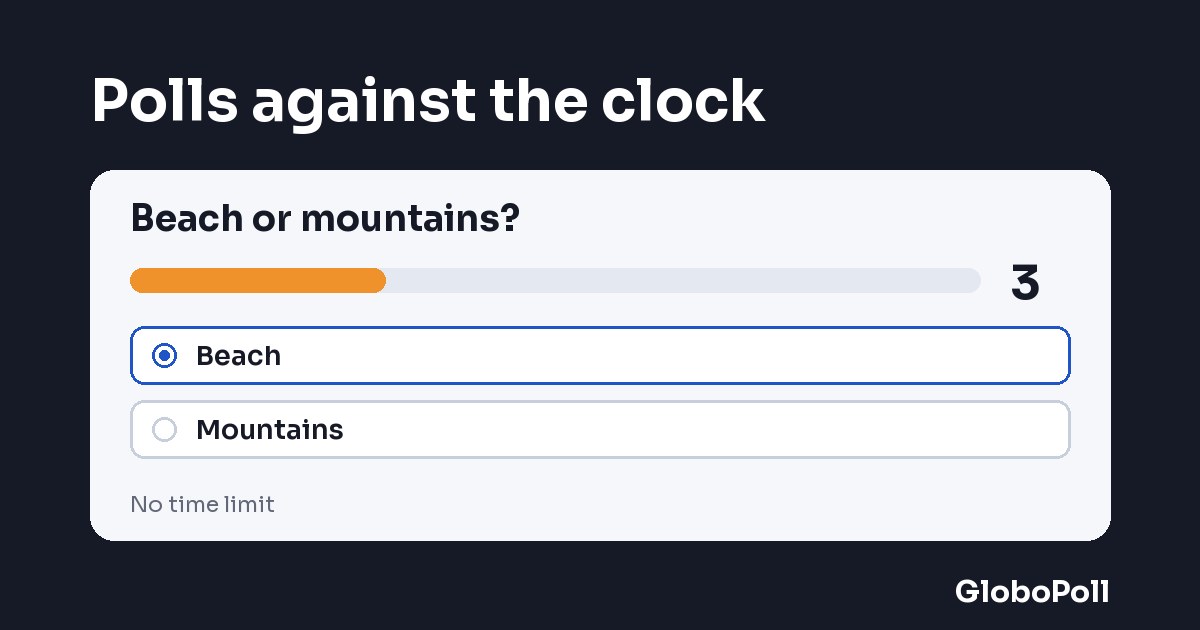
Some questions are best answered without overthinking: “beach or mountains?”, “pineapple on pizza, yes or no?”. For those, from today you can set a time to answer: between 5 and 60 seconds, with a visible countdown. It is in every plan, including the free one.
How do I turn it on?
In your poll's editor, on the Settings tab, pick a value under “Time to answer”. It is a setting, not content: you can change or remove it once the poll is published, with no new review.
It works in polls you answer at a glance: single choice, multiple choice, yes / no, rating and pairwise comparison, where the clock restarts for each duel. It is not available for ranking, points, brackets or questionnaires, which need thought.
What does the voter see?
- The question and a “Start” button. The clock does not run while they read.
- Pressing it shows the options and a bar that empties, with the seconds as a number. The last stretch turns amber.
- If time runs out: “Time's up!” and a “Try again” button.
The same happens in the widget embedded on another website.
Can the vote be lost?
No. The limit is a game, not a rule: whoever runs out of time can try again as often as they like, and one vote per person works exactly as before.
There is also, next to the clock, a link that is always there: “Answer with no time limit”. Whoever uses it votes without a countdown, and their browser remembers it for the next polls. Not everyone reads or handles a mouse at the same speed, and a public consultation cannot leave anyone out because of that.
What new figure do I get?
From the votes cast against the clock we work out the average response time, shown next to the results (“People answer in 3.2 s on average”) and on the Results tab of your dashboard. It is a curiosity, not a method figure: it does not change the count.
To review which kind of poll suits each question, see Nine poll types: which one to use, and when.